Your Plugin Graveyard Is the Reason Your CPC Is Rising
You did not set out to build a slow website. You set out to build a business. You installed a plugin for SEO, one for contact forms, one for caching, one for security, one for analytics, one for your booking system, one for GDPR compliance. Each one made sense on its own. Together they built a Plugin Graveyard — a stack of render-blocking scripts that fires on every page load, on every device, on every click you paid for.
This article does not ask you to accept that on assertion. Every number below is either published by Google, drawn from the public Core Web Vitals Technology Report, or measured on wordpress.com itself and linked so you can check it.
What the Public Data Actually Says About WordPress
The Core Web Vitals Technology Report, built from Google's Chrome User Experience Report and HTTP Archive, tracks how real visitors experience sites grouped by the platform underneath them. It is field data from actual Chrome users, not a lab simulation.
In the November 2025 snapshot, 46.3 percent of WordPress origins passed Core Web Vitals — last among the major platforms tracked. For context, the 2025 Web Almanac put the figure for all mobile origins at 48 percent. WordPress is not catastrophically behind the web. It is behind it, consistently, at enormous scale, and it is not closing the gap while managed and edge-rendered stacks pull away.
The Measurement — wordpress.com, 3 September 2026
You do not have to take the aggregate on trust either. This is the Chrome User Experience Report for wordpress.com — real Chrome visitors, latest 28-day period, various devices, various network connections. Not a simulation.
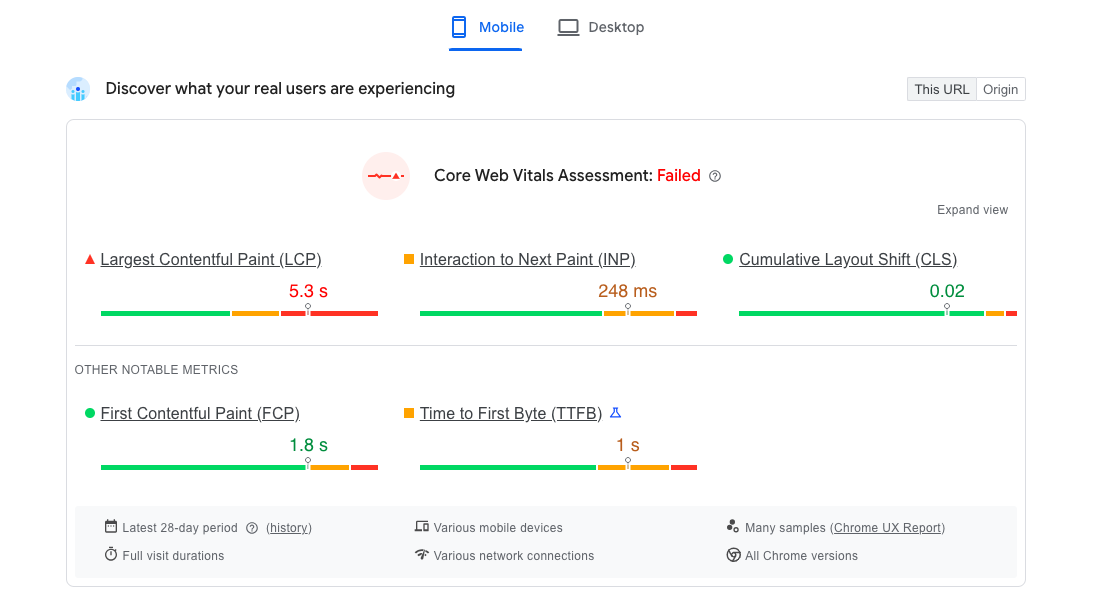
| Field metric | wordpress.com | Google threshold | Result |
|---|---|---|---|
| Core Web Vitals Assessment | Failed | All three must pass | Fail |
| Largest Contentful Paint | 5.3 s | 2.5 s or less | Fail |
| Interaction to Next Paint | 248 ms | 200 ms or less | Fail |
| Cumulative Layout Shift | 0.02 | 0.1 or less | Pass |
| Time to First Byte | 1 s | 800 ms or less | Fail |
Open the 28-day history and read it yourself.
Be precise about what this is. wordpress.com is Automattic’s own commercial homepage, on managed infrastructure they control end to end, with every commercial reason to be fast. It is not a self-hosted install carrying a plugin stack. It is close to the best case, and the best case fails Core Web Vitals on real visitors.
Look at the bottom row. Time to First Byte of one second, on the platform vendor’s own hosting. Before a single byte of content arrives, 40 percent of the Largest Contentful Paint budget is already gone. That is the whole argument in one number, and it is the number no plugin can reach.
Note also that Cumulative Layout Shift passes comfortably at 0.02. Layout shift is not the WordPress problem, whatever older advice says.
Which Vital Is Actually Failing
Across the platform as a whole, the interesting part is which vital fails. WordPress passes INP (Interaction to Next Paint) at around 86 percent — barely below the web average. The failure is concentrated in LCP (Largest Contentful Paint), and the driver underneath LCP is TTFB (Time to First Byte): how long your server takes to send the first byte of the page before the browser can begin doing anything at all.
That single fact reframes the entire problem. If your server takes a second to respond, no amount of image compression, lazy loading, or script deferral will get LCP under Google's 2.5 second threshold. The budget is already spent before your front end gets a turn.
Individual sites can and do fail INP as well — wordpress.com does, at 248 ms. But across the platform INP is not where WordPress loses ground. LCP is, and TTFB is why.
The Three Vitals, and Which One Is Actually Failing
Google's thresholds, all measured at the 75th percentile of real visits, all three required to pass:
| Metric | Good | What it measures |
|---|---|---|
| LCP — Largest Contentful Paint | ≤ 2.5 s | When the main content becomes visible |
| INP — Interaction to Next Paint | ≤ 200 ms | How fast the page responds when tapped |
| CLS — Cumulative Layout Shift | ≤ 0.1 | How much the layout moves while loading |
If you have read older advice referring to FID (First Input Delay), it was retired in March 2024 and replaced by INP, which is considerably harder to pass because it measures every interaction across the visit rather than only the first one. A plugin stack that scraped through on FID can fail on INP without anything about the site changing.
CLS is usually not your problem. Browser refinements and framework defaults that attach width and height to images automatically have quietly fixed layout shift across most of the web. If a plugin is causing visible jumps on your landing page it is worth fixing, but it is rarely what is costing you money.
LCP almost certainly is. And on WordPress the cause is usually upstream of anything you can reach from the dashboard.
Why Caching Plugins Do Not Solve This
A caching plugin reduces the work your server does to build a page. That helps TTFB, and on a slow shared host it can help meaningfully. What it cannot do is change where your server is.
The public hosting benchmarks make the size of that gap plain. Edge-rendered platforms — Cloudflare, Vercel, Netlify — cluster around 83 to 88 percent of visits achieving a good TTFB. Shared hosting falls off sharply. That spread is the largest single performance gap in the entire benchmark dataset, and it is the structural reason WordPress's aggregate Core Web Vitals number lags.
Your visitor in Vancouver requesting a page from a shared host in London waits for the round trip no matter how efficiently that host assembles the page. A caching plugin optimises the wrong half of the problem. Distance is not a software setting.
What This Costs on a Paid Click
Google Ads scores landing page experience as one of three Quality Score components, alongside expected click-through rate and ad relevance. It is reported as a relative rating — Below average, Average, or Above average — measured against other advertisers competing for the same keyword. There is no published PageSpeed number that acts as a pass mark, and anyone who quotes you one is guessing.
What Google does document is the mechanism. Landing page experience feeds Ad Rank, and Ad Rank determines both whether your ad shows and what you pay when it is clicked. A slow page does not get you disqualified. It quietly raises your entry price against a competitor bidding the same amount on a faster page. That is the Algorithm Tax™ — not a penalty you are notified about, a premium you are charged.
On the revenue side, the most rigorous public study remains Milliseconds Make Millions, run by Deloitte with Google across 37 retail, travel, luxury and lead-generation brands in Europe and the US. A 0.1 second improvement in mobile site speed lifted retail conversion rates by 8.4 percent, retail average order value by 9.2 percent, and travel conversions by 10.1 percent. One tenth of a second — below conscious perception — moved every step of the funnel.
Note what that study does and does not say. It does not promise you a specific percentage. It establishes that the relationship between speed and conversion is real, measured, and steep at the margin. Your own numbers are the only ones that matter, which is why the first step is measuring them rather than modelling them.
Run your own numbers: IntelScan on our homepage pulls a live Lighthouse report for your URL across all four categories, then takes your monthly ad spend and shows you what the gap is costing you.
The Subdomain Trap — Why Most Agencies Get This Wrong
The common agency recommendation is to build a fast landing page on a subdomain — fast.yourbusiness.com — separate from the WordPress install. It solves the speed problem and creates a worse one.
Every backlink, every indexed page, every E-E-A-T (Experience, Expertise, Authoritativeness, Trustworthiness) signal you have accumulated lives on your main domain. Google treats a subdomain as a substantially separate entity for many of those signals. Your AEO (Answer Engine Optimisation) citations point at the main domain. Your GEO (Generative Engine Optimisation) signals — the ones deciding whether AI assistants surface your business at all — end up split across two destinations.
You spent years building that authority. The subdomain answer asks you to set it aside in exchange for speed. There is a better engineering answer.
The Reverse Proxy Fix — Edge Delivery Without Touching WordPress
A Cloudflare Workers reverse proxy answers the request at the network edge, before it reaches your WordPress server. When a paid click arrives at your landing page URL — the same URL, on the same domain, no subdomain — it is served from an edge node typically within 20 milliseconds of the visitor: no render-blocking plugin scripts, no PHP execution, no database query.
This attacks the metric that is actually failing. TTFB stops being a function of where your host sits and becomes a function of where your visitor sits. LCP follows, because LCP was waiting on TTFB the whole time.
Your WordPress installation is untouched. You publish in the same dashboard, keep the same theme, keep the same plugins. Your domain, backlinks, organic rankings, AEO citations and GEO signals stay exactly where they are and keep accumulating. The visitor lands on yourdomain.com/your-landing-page, as before.
What edge delivery produces is not a claim you have to take on faith. Our vGate landing page runs this architecture, and its mobile PageSpeed report reads: 99 Performance, 1.7 s First Contentful Paint, 1.7 s Largest Contentful Paint, 0 ms Total Blocking Time, 0 Cumulative Layout Shift, 3/3 Agentic Browsing. Run it yourself, then run your own landing page and compare.
The honest boundary: this is a targeted fix for the pages where speed converts into money — the destinations you send paid traffic to. Checkout flows, member areas and anything requiring WordPress session handling stay on WordPress, and the visitor moves into them without interruption.
The Retrieval Problem Nobody Has Measured Yet
PageSpeed Insights now reports an Agentic Browsing score alongside the familiar four. It grades how readily an automated agent — a crawler, or an AI assistant fetching your page to answer somebody's question — can retrieve and parse your content in a single pass.
This is the same architectural problem wearing different clothes. ChatGPT, Gemini, Perplexity and Google's AI surfaces reward clean, fast, semantically structured HTML. Pages that need a JavaScript runtime and a chain of plugin scripts to assemble their content get partial extraction, or get skipped. If a prospect asks an assistant to recommend a supplier in your category and your page cannot be read in one fetch, you are not on the shortlist — and unlike a Google ranking, nothing tells you that you were considered and dropped.
vKernel™ — Closing the Signal Loop
Edge delivery solves the Latency Tax. A second leak runs alongside it: the Signal Leak. Your conversion tracking fires client-side, from the browser, after the page loads. On a slow page a meaningful share of bounces happen before the pixel executes. The click is paid for. The bounce is never recorded. Google's delivery algorithm optimises toward the visitors it can see, and it cannot see the ones who left first.
vKernel™ deploys server-side event capture at the Cloudflare edge. The session is recorded from the moment the request arrives — before any framework loads, before any pixel has a chance to fail. Ad blockers cannot intercept server-side events and cookie expiry does not end a server-side session. The algorithm receives complete data and optimises against your actual customers rather than the subset whose browsers cooperated.
Two leaks, two fixes. Edge delivery closes the Latency Tax. Server-side capture closes the Signal Leak. Quality Score is then calculated on a page that is genuinely fast, and the Algorithm Tax™ falls.
Frequently Asked Questions
Does WordPress affect Google Ads Quality Score?
Yes, through the landing page experience component. Google reports it as a relative rating — Below average, Average or Above average — against other advertisers on the same keyword, not as a PageSpeed number. A slower page does not stop your ad running; it raises what you pay relative to a competitor bidding the same amount on a faster one. Anyone quoting you a precise percentage increase is inventing it. What you can verify is your own score and your competitors'.
How many WordPress plugins is too many?
There is no fixed number, and counting them is the wrong diagnostic. What matters is how many inject JavaScript into the front end of the pages your ads point to. Run PageSpeed Insights on your landing page and read the Total Blocking Time attribution — it names the scripts costing you the most. Ten well-behaved plugins can outperform three badly built ones.
Can a caching plugin fix my WordPress Google Ads problem?
Partially. Caching reduces the work your server does per request, which helps Time to First Byte on a slow host. It cannot change where your server is, and it does not remove render-blocking JavaScript that other plugins inject. The public hosting benchmarks show edge-rendered platforms achieving good TTFB on 83 to 88 percent of visits while shared hosting falls far behind — that gap is geographic and architectural, and no plugin reaches it.
Why does WordPress fail Core Web Vitals more than other platforms?
Not because of any single flaw. WordPress passes INP at roughly 86 percent, close to the web average. The failure concentrates in LCP, and the driver beneath LCP is server response time. WordPress runs disproportionately on shared and regional hosting, and slow TTFB spends the LCP budget before the page starts rendering. It is a hosting and distance problem that presents as a WordPress problem.
Will a fast landing page on a subdomain hurt my SEO?
It splits your signals. A subdomain is treated as substantially separate for authority purposes, so backlinks, E-E-A-T signals and indexing history on your main domain do not carry over. Edge delivery avoids this by keeping the landing page on your primary domain with no architecture change visible to crawlers.
What is the Plugin Graveyard?
Plugin Graveyard is our term for the accumulated stack of installed-but-unmaintained plugins that collectively degrade page performance. Each one made sense when it was installed. Together they form a render-blocking chain that pushes a landing page past Google's Core Web Vitals thresholds and triggers the Algorithm Tax™ on every click you buy.
Does this work for WooCommerce product pages?
For product pages used as paid ad destinations, yes. WooCommerce pages carry additional JavaScript for cart state, pricing and payment integrations, which makes them among the heaviest in the WordPress ecosystem — and the ones with most to gain from edge delivery. Checkout itself requires WordPress session handling and stays on WordPress.
How do I check my own numbers?
Open PageSpeed Insights, enter the exact URL your ads point to and select Mobile. Read the field data at the top first — that is what your real visitors have experienced over the last 28 days, and it is the section that matters. If Largest Contentful Paint is above 2.5 seconds or Time to First Byte is above 800 milliseconds, the fix is not in your plugin list. For a full audit alongside your ad spend, run IntelScan.
Ready to Fix This on Your Site?
Run your site through PageSpeed Insights and send me the score. Free diagnosis. No pitch. Just the numbers.